
This light-weight add on allows you to set per-item quantities and email addresses you would like to send out alerts for. Once you install and activate the add on, you will see one new permission setting on the “Notifications” tab to set the minimum user role that can access this override.
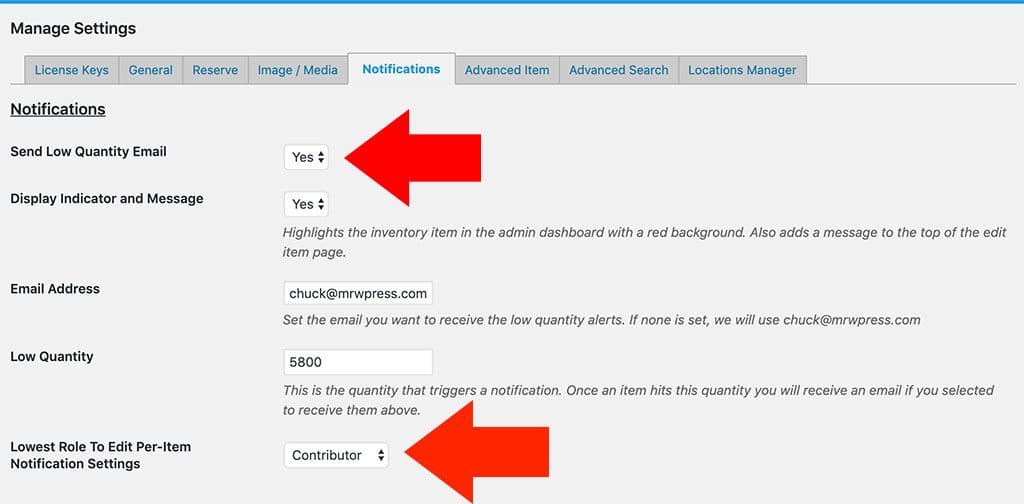
You will also need to be sure that you have the “Send Low Quantity Email” set to “Yes”. Without setting this to yes, the system is basically not sending notifications so the per item override notification section will not show. So be sure these two settings are set appropriately.
Once you have set these, you can now visit any item in your dashboard. Scroll to the bottom of the item when you are on the item edit page and you will see a notifications section that looks like this:
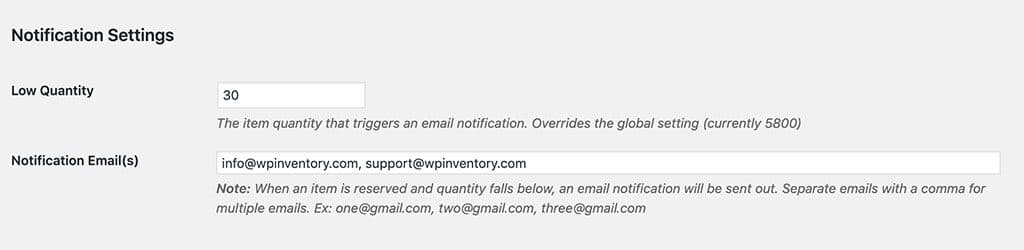
As seen here, there is a quantity of 30 for this item. When this item’s quantity reaches 30 or less, emails will be sent out to the two emails set: [email protected] and [email protected].
Note: These alerts are sent out when reservations are made. They do not send when an admin edits an item or makes a ledger entry.
