
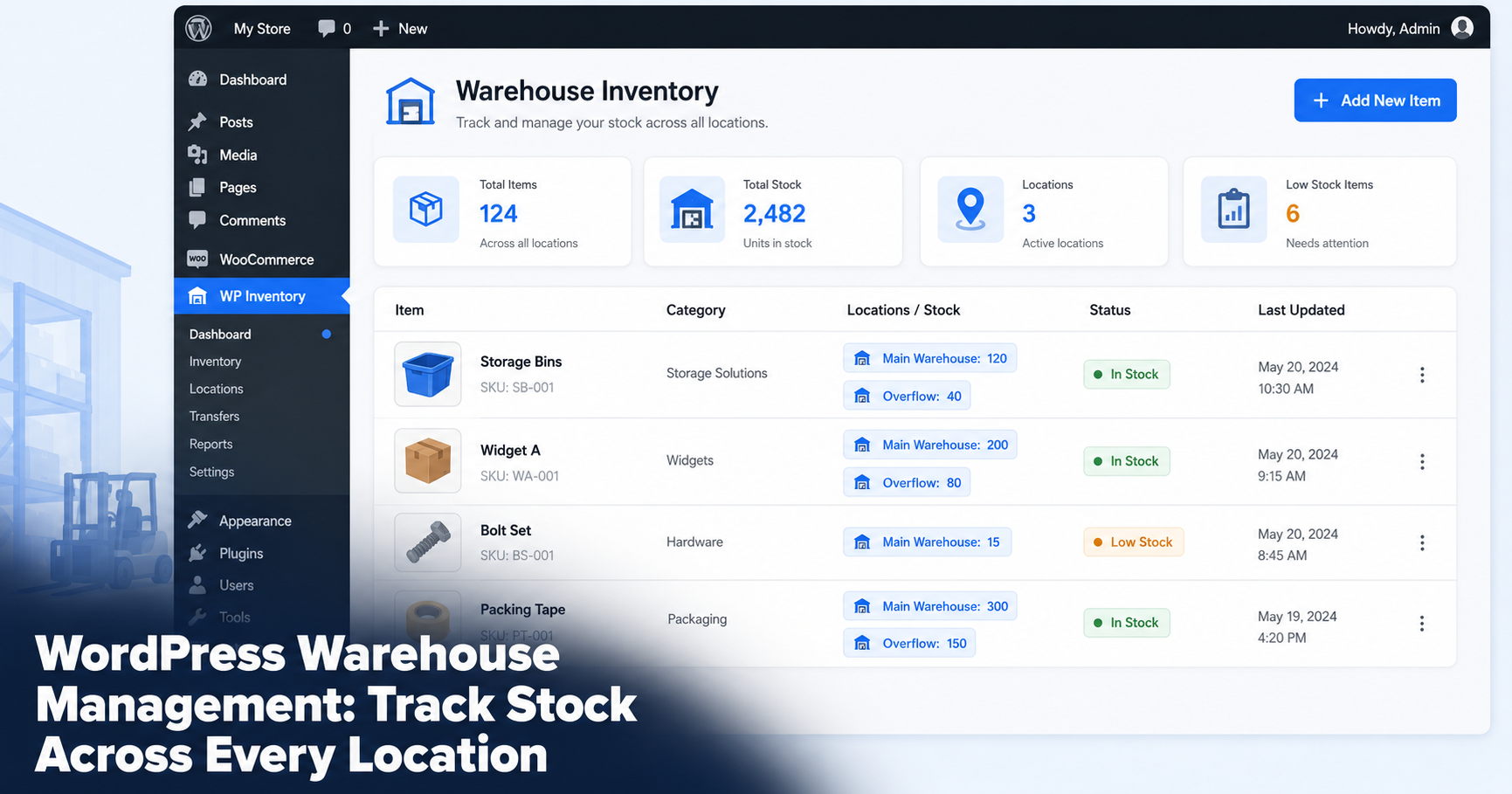
Multi-location inventory management answers two basic questions: how much inventory do you have, and where is it? If your stock is spread across warehouses, offices, stockrooms, depots or other physical locations, WordPress can provide a central place to track those quantities without requiring WooCommerce..
This guide explains how to manage inventory across multiple locations with WP Inventory Manager, including location-based quantities, inventory transfers, search and user access. It is designed for lightweight inventory tracking rather than warehouse fulfillment, shipping or logistics management.
Multi-location tracking builds on the same core inventory structure. See the complete guide to managing inventory in WordPress without WooCommerce for the broader setup.
Do you need WooCommerce for multi-location inventory?
Not necessarily. WooCommerce is designed primarily around ecommerce transactions, including products, orders, checkout and payments. If you only need to track inventory quantities across physical locations, adding an ecommerce platform may introduce functionality you do not need. WooCommerce is built to sell products online: carts, checkout, payment gateways and shipping. A warehouse is about what sits on the shelf, not what is in a shopping cart.
You need to know quantities, locations, reorder points and who moved what. None of that requires a storefront. WP Inventory Manager runs on any WordPress site as a standalone system, so you get warehouse tracking without the weight of an ecommerce platform you will never use.
What multi-location inventory management requires
Before adding any tool, it helps to be clear on what a working warehouse system has to do.
- Accurate stock counts. A live quantity for every item that staff can update as goods move in and out.
- Location awareness. Stock assigned to warehouses, offices, stockrooms, depots or other physical locations, with quantities tracked by location.
- Reorder points. Minimum levels that warn you before an item runs out, not after.
- Fast search. The ability to find any SKU in seconds across a large catalog.
- Controlled access. Each team member sees and edits only what they should.
WP Inventory Manager combines core inventory records with optional add-ons for workflows such as multiple locations, advanced search and user access.
Track inventory across multiple locations
The Locations Manager add-on extends WP Inventory Manager for multi-location inventory. Each item can be associated with physical locations so your team can see where inventory is stored. Each item carries a separate quantity for every location you define, so you always know where stock actually sits.
With Locations Manager you can:
- See total stock company-wide or drill into a single warehouse.
- Set up as many locations as you need, from two depots to dozens of zones.
- Transfer items between locations and keep both counts correct.
Example: A parts distributor stores fast-moving items in a main warehouse and overflow in a second unit across town. The dispatcher opens the item, sees 120 units in the main warehouse and 40 in overflow, then ships from the right one without a phone call.
Monitor stock levels across your inventory
Running out of a core item is what costs a warehouse money. WP Inventory Pro adds the fields that prevent it: minimum and maximum quantity per item, plus low-quantity email alerts.
Set a reorder point on each SKU and the system emails you when stock drops to that level. Pro also records quantity history, so you can see who adjusted a count and when, which matters when numbers do not add up.
Example: A reorder point of 25 is set on shipping boxes. When the count hits 25, an email lands in the manager’s inbox and the item is flagged in the admin, so the next order goes out before the shelf is empty.
Search across larger inventories
A warehouse catalog grows fast. Once you pass a few hundred SKUs, scrolling stops working. The Advanced Search add-on turns your inventory into a filterable database, so staff narrow results by category, location, custom field or keyword without paging through the whole list.
That speed matters most at the moment someone is on the floor trying to confirm whether an item is in stock.
For a detailed setup, see how to add search and filters to your WordPress inventory.
Control inventory access for your team
Not everyone should be able to change every count. The Advanced User Control add-on sets, per person, whether each user can edit all items, only the ones they added, or none, with the same control over viewing. A bulk user screen applies the rules to a whole team at once.
The result is a system the warehouse manager trusts: floor staff update what is theirs while the master count stays protected.
Import and update inventory in bulk
Warehouses live by the periodic count. The Import / Export add-on makes it a quick round trip rather than a week of manual edits. Export your current inventory to CSV, update the counts in a spreadsheet during the count, then import the file back to apply every change at once. New stock can be added the same way instead of one screen at a time.
What you need for multi-location inventory
The free WP Inventory Manager plugin provides the core inventory records, categories and front-end display. For inventory spread across multiple physical sites, Locations Manager adds location-based functionality, while other optional add-ons can extend the setup with advanced search, imports, inventory history and user controls.
See the WP Inventory Manager add-ons or current plans and pricing to choose the functionality your workflow requires.
Is WP Inventory Manager a Warehouse Management System?
No. WP Inventory Manager is designed for inventory tracking inside WordPress, including workflows where stock is spread across multiple physical locations. It is not a full warehouse management system for picking, packing, shipping, receiving, procurement or fulfillment automation.
If your main requirement is knowing what inventory you have and where it is stored, a WordPress-based inventory system may be sufficient. Businesses that need advanced warehouse operations should use dedicated WMS software.
